How this site is built: a local Puck editor and a static site on Azure
This is the first post on my site, so it's about the site itself. I wanted three things:
- A visual editor, so I can rearrange my homepage without hand-editing HTML.
- Free, fast, public hosting with HTTPS and no servers to maintain.
- Strong protection against tampering. Nobody but me should be able to change what visitors see.
A typical CMS like WordPress gives you the first two, but at the cost of the third. The editor, the database and the public site all live on the same internet-facing server. My approach splits them in two. The editor runs only on my computer, and the cloud only ever hosts static files.
The architecture at a glance
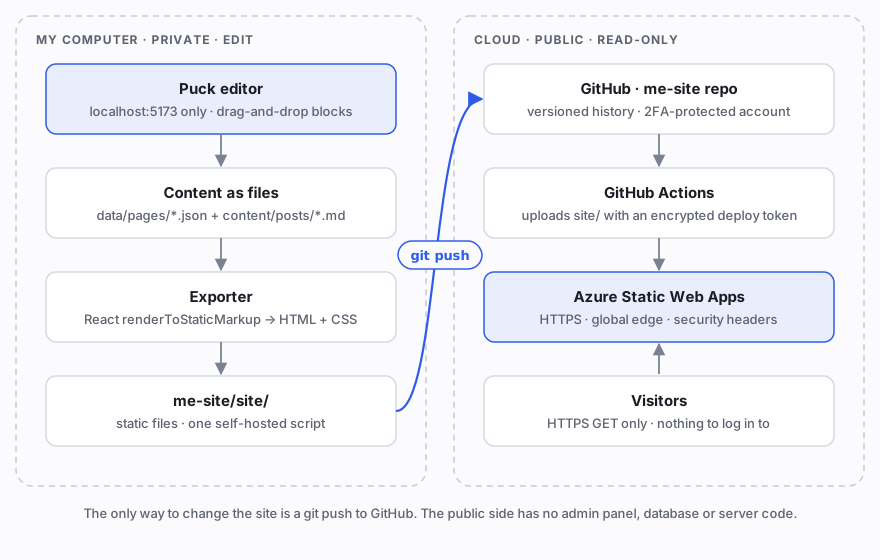
There are two halves, connected by a single git push:
| My computer (private) | Cloud (public) | |
|---|---|---|
| Purpose | Edit and build | Serve |
| Software | Puck editor, exporter, Node.js | GitHub, GitHub Actions, Azure Static Web Apps |
| Who can access it | Only me (localhost) |
Everyone, read-only |
| Can it change content? | Yes | Only through a deploy from GitHub |
Two private GitHub repositories hold the code:
me-site-builder: the editor, the page data, the Markdown posts and the exporter.me-site: only the generated HTML plus a deployment workflow.
The local half: Puck editor + exporter
Puck is an open-source, drag-and-drop visual editor for React. You describe your building blocks ("components") in a config. Puck then gives you an editor where you drag them onto a page and fill in their fields. Every page is saved as plain JSON.
My config has blocks for this site: Hero, About, Skills, Experience, Projects, Contact links, a Blog post list and some basics. The site is bilingual, so every text field stores both languages: the editor shows a 繁體中文 input and an English input side by side, and a toggle switches which language the canvas previews. Each block is an ordinary React component, which picks its text with a small t() helper:
Hero: {
  fields: {
    name: lt("Name"),              // { "zh-TW": "…", en: "…" }
    role: lt("Role / title"),
    tagline: lt("Tagline", "textarea"),
  },
  render: ({ name, role, tagline, puck }) => {
    const { locale } = puck.metadata;
    return (
      <section className="s-hero">
        <h1>{t(name, locale)}</h1>
        <p>{t(role, locale)}</p>
        <p>{t(tagline, locale)}</p>
      </section>
    );
  },
},
The editor runs on a Vite dev server bound to 127.0.0.1. Other machines on the network can't reach it. When I click Publish, a small local API does two things:
- It saves the page JSON to
data/pages/<page>.json. - It runs the exporter.
The exporter is the core of the design. It reuses the same Puck config, but renders it on the server with React:
import { renderToStaticMarkup } from "react-dom/server";
import { Render } from "@puckeditor/core/rsc";

const html = renderToStaticMarkup(
  <Render config={config} data={pageJson} metadata={{ base, posts }} />,
);
It renders every page once per language: Traditional Chinese under /tw/ and English under /en/; / sends visitors to their browser's language (English unless it's Chinese). Each version gets the right lang attribute, hreflang links and a language switcher on the blog pages. The exporter wraps each result in an HTML shell (title, description, Open Graph tags) and writes it to me-site/site/. It also:
- turns Markdown posts like this one into
/blog/<slug>/pages, with syntax highlighting done at build time (post.en.mdandpost.zh-tw.mdwith the same slug are translations of each other); - builds the blog index, a 404 page, and the RSS feed and sitemap;
- writes
staticwebapp.config.json, which tells Azure which security headers to send.
The output is plain HTML and CSS. The only JavaScript is the interactive 3D scene on the home page: a small solar system drawn with three.js. My avatar is the star at the centre, rendered as a cloud of particles, and the technologies I work with (React, Python, Azure, PostgreSQL, Claude…) are planets on their own orbits. Clicking a planet opens the posts with that tag. You can drag to tilt the system, and sweep the pointer through the star to scatter it. The planets, their order, colours and icons are all set in the editor. The exporter bundles it into a single self-hosted file, assets/hero3d.js, and only the home page loads it. Every other page ships no JavaScript at all, and the home page's name and GitHub link are plain HTML, so they work even without scripts or WebGL. What I preview locally is byte-for-byte what visitors get.
The cloud half: GitHub + Azure Static Web Apps
Azure Static Web Apps hosts static files from Microsoft's global edge network. The free plan includes HTTPS certificates and custom domains, which is ideal for a personal site.
Deployment is a short GitHub Actions workflow in the me-site repo. There's nothing to compile, so it just uploads the folder:
- uses: Azure/static-web-apps-deploy@v1
  with:
    azure_static_web_apps_api_token: ${{ secrets.AZURE_STATIC_WEB_APPS_API_TOKEN }}
    action: upload
    app_location: site
    skip_app_build: true
The deploy token is stored as an encrypted GitHub secret. It never appears in the code or in logs.
Build your own in an afternoon
Here's the whole flow, from an empty laptop to a public website.
1. Create the two repos (private is fine), clone them side by side and start the editor
mkdir ~/code && cd ~/code
git clone https://github.com/<your-account>/me-site.git
git clone https://github.com/<your-account>/me-site-builder.git
cd me-site-builder
npm install
npm run dev        # open http://localhost:5173
2. Design your pages. Drag blocks from the left, select one, and fill in its Chinese and English fields on the right. Use the 中 / EN toggle to switch the preview language, and the page menu to add pages like /about/. Click Publish to save and export, and 預覽 (Preview) to see the exported site.
3. Write articles in Markdown
npm run new-post -- "My first article" --lang en
# creates content/posts/YYYY-MM-DD-my-first-article.en.md (as a draft)
Remove draft: true from the front matter when the post is ready.
4. Create the Azure Static Web App (one time)
- In the Azure Portal, create a Static Web App. Choose the Free plan and, for the deployment source, Other.
- Copy its deployment token. Add it to the
me-siteGitHub repo as the secretAZURE_STATIC_WEB_APPS_API_TOKEN.
5. Publish
npm run publish:site
This exports the site, commits site/ in the me-site repo and pushes it. GitHub Actions deploys it, and about a minute later it's live at https://<name>.azurestaticapps.net (or your custom domain).
Why this is hard to hack or deface
Most website defacements share one root cause: the public website can also change its own content. A login page, an admin panel, a plugin with a file-upload bug, a database reachable by injected SQL: each of these lets an attacker rewrite the content from the internet. This design removes that capability from the public side entirely.
1. Nothing on the public side can write
The site Azure serves is a folder of static files. It has:
- No admin panel or login page, so there's no password to brute-force or phish.
- No database, so SQL injection has nothing to inject into.
- No server-side code (no PHP, no Node runtime, no plugins), so there's no remote code execution to exploit.
A visitor can only fetch files that already exist. The way to change content is to deploy a new version, and deploying requires credentials the public side never sees.
2. The editor isn't on the internet
The editor and its save/export API exist only while npm run dev is running on my computer. They listen on 127.0.0.1, so even other devices on my Wi-Fi can't reach them. In a typical CMS, the editor is the most valuable thing to attack. Here, it isn't reachable at all.
3. One narrow, authenticated write path
Content can reach production in only one way: git push to GitHub, then GitHub Actions, then Azure. To publish something malicious, an attacker would need one of these:
- my GitHub account, which is protected by two-factor authentication or passkeys; or
- the Azure deployment token, which is stored encrypted in GitHub secrets and can be reset in the Azure Portal at any time; or
- my Azure account, also protected with MFA.
Defending three well-understood accounts is far easier than defending a whole web application.
4. Every change is versioned, so rollback is instant
The published HTML is committed to git, so every deploy has a reviewable diff and an author. If something unexpected ever appears, I can see exactly what changed. To roll back, I run git revert and push, and Azure redeploys the previous version. A branch-protection rule on main can also require pull requests, so even a stolen laptop session can't silently push to production.
5. Almost no JavaScript, and a strict Content Security Policy
The only script on the site is my own 3D bundle, served from my own domain. That lets Azure send a very strict policy with every response:
Content-Security-Policy: default-src 'self'; script-src 'self'; object-src 'none';
  base-uri 'none'; form-action 'none'; frame-ancestors 'none'; ...
Strict-Transport-Security: max-age=31536000; includeSubDomains
X-Frame-Options: DENY
X-Content-Type-Options: nosniff
script-src 'self' means the browser only runs script files from my own site. It refuses inline scripts, eval, and scripts from any other domain, even if one were somehow injected into a page. That shuts down the usual forms of cross-site scripting (XSS). The 3D scene only draws on a canvas: it has no forms, no cookies, no API calls and nothing it could change. frame-ancestors 'none' stops other sites from embedding mine for clickjacking, and HSTS forces HTTPS.
6. Build-time dependencies stay at build time
React, Puck, the Markdown parser and the rest of node_modules run only on my machine during export, and none of them is deployed. The one exception is three.js, which is bundled into assets/hero3d.js and runs in the visitor's browser, isolated from anything that could change the site. A vulnerable build-time package can't be exploited through the live site, because the live site contains no code from it. Only its output is deployed, and I can review that output in the git diff.
What this design doesn't protect against
No architecture is "unhackable", so here are the remaining risks and how I handle them:
- My computer. Malware on my machine could tamper with content before I push. I keep my OS updated, use disk encryption, and review the diff before publishing.
- My accounts. GitHub and Azure are now the keys to the site. I use passkeys or MFA on both and grant no unnecessary access.
- The deploy token. If it ever leaks, I reset it in Azure and update the GitHub secret, which takes minutes.
- DNS. With a custom domain, whoever controls DNS controls where visitors go. I keep the domain registrar account locked down with MFA and registrar lock.
Wrapping up
This setup splits the site into a private, full-featured editor and a public, read-only website. I get drag-and-drop editing and Markdown writing locally. Visitors get fast, HTTPS-only static pages. The public side has almost no attack surface, because there's nothing on it that can change content.
My repositories are private, so this post describes the architecture rather than offering a download; the same pieces (Puck, Vite, Azure Static Web Apps) are all open and free to use. Thanks for reading!